3D Printer Infill Patterns for Strength, Speed, and Efficiency
3D-printed parts benefit from internal structures that enhance strength and printing speed. The choice of infill pattern and density is crucial for optimizing print characteristics.
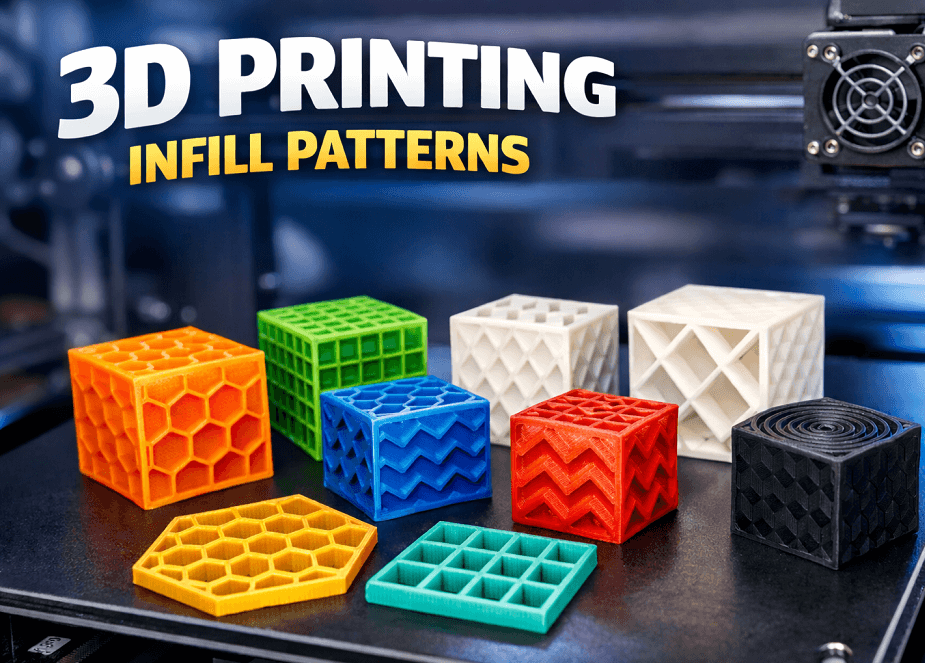
Shenzhen Creality 3D Technology Co., Ltd. has released a guide detailing 3D printing infill patterns. The company aims to help users optimize the strength, print speed, and material efficiency of their 3D-printed objects by selecting appropriate internal structures.
The guide explains that 3D-printed parts are typically not solid but incorporate an internal lattice structure, known as infill. The density, or percentage of fill, and the chosen pattern of this infill significantly influence the part's weight, durability, and print time. Creality emphasizes that selecting the correct infill pattern is a more effective method for improving part strength compared to simply increasing wall thickness or infill density.
Commonly available infill patterns include Grid, Cubic, Gyroid, Honeycomb, Lines, Zigzag, and Lightning. The Grid and Cubic patterns offer good multi-directional strength, while Lines and Zigzag patterns facilitate faster printing due to their continuous path movements. The Lightning pattern focuses material deposition only where needed, optimizing material savings and speed.
When choosing an infill pattern, users should consider the intended application of the part. Gyroid and Cubic patterns are suitable for multi-axis loads. For material and weight savings, patterns like Lines, Zigzag, or Honeycomb are recommended. For the fastest printing, Lines, Zigzag, or Lightning patterns are preferable. Creality also offers adaptive infill within its Creality Print software, which allows for density adjustments in specific areas, further enhancing efficiency.