Creality Releases Guide for SPARKX i7 Nozzle Cleaning
3D printer manufacturer Creality has published a detailed guide for cleaning the SPARKX i7 nozzle using the "cold pull" technique.
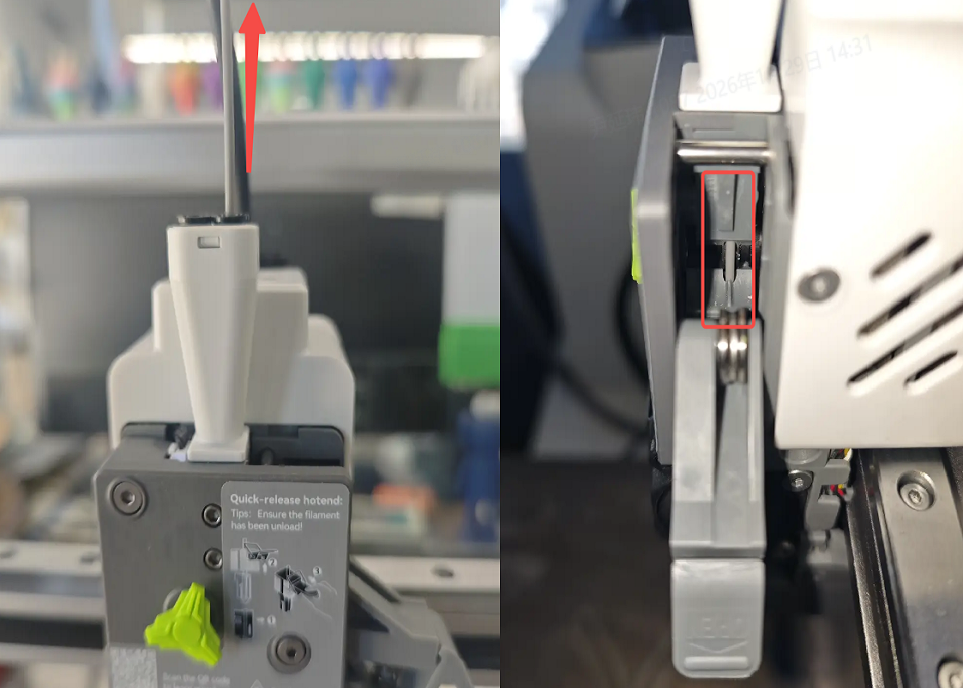
Shenzhen Creality 3D Technology Co., Ltd., a prominent 3D printer manufacturer, has released a new instructional guide for cleaning the nozzle of its SPARKX i7 model. The method, known as a "cold pull," aims to clear blockages and maintain smooth filament extrusion.
In FFF (Fused Filament Fabrication) printing, filament is melted and extruded through the nozzle. Consequently, keeping the nozzle and heat break channels clean is essential for achieving quality prints. Creality's guide outlines the step-by-step procedure for performing a cold pull on the SPARKX i7 printer.
The instructions detail the initial steps of unloading filament, removing the PTFE tube, and detaching the toolhead back cover. The nozzle is then heated to the printing temperature specific to the filament being used. Filament is fed through the hotend until residual material is fully extruded. Subsequently, the nozzle temperature is lowered to approximately 80 degrees Celsius, after which the filament is slowly pulled out.
Confirmation of a successful cleaning is achieved by inspecting the removed filament. If there are no discolored particles or burnt material present, the nozzle is considered clean. The process may need to be repeated multiple times for a thorough cleaning. Creality provides resources and instructions to address common 3D printing maintenance issues.