Methods to Back Up Apple Mail to External Hard Drive
Recoveryfix has published a guide detailing methods for backing up Apple Mail emails to an external hard drive. These techniques aim to help users free up storage space and secure their email data.
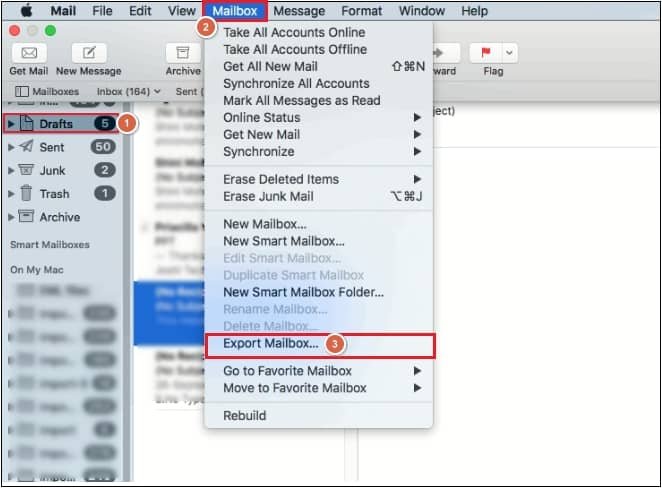
Vikas Singh from Recoveryfix has outlined procedures for users to back up their Apple Mail data to an external hard drive. The guide addresses the common issue of limited mailbox storage on Mac devices, providing solutions to free up space while safeguarding email communications against potential data loss or corruption.
The benefits of regular email backups include mitigating recovery costs in case of data loss, protecting emails from malware and viruses, preventing storage capacity issues, ensuring offline access to emails, and maintaining business continuity during server downtime.
Two primary methods are detailed for performing the backup. The first involves using Apple Mail's built-in export function. Users are instructed to launch Mail, select the desired mailbox, go to the 'Mailbox' menu, choose 'Export Mailbox,' and then specify a location on an external drive for saving the data. This process needs to be repeated for each mailbox folder.
The second method utilizes macOS's native Time Machine utility. This requires connecting an external hard drive. Users must navigate to System Preferences, select Time Machine, enable the backup function, and choose the connected external drive as the backup destination. Options within Time Machine allow users to specify Apple Mail for backup and enable automatic backups.
For users requiring different file formats, such as PST for Outlook compatibility, Recoveryfix also suggests a third alternative. Their MBOX to PST Converter tool can convert Mac Mail files into various formats including PST, MSG, EML, and Office 365, supporting the conversion of single or multiple files simultaneously.