Methods to bypass AI Overviews in Google Search results
Google provides built-in settings and URL parameters that allow users to filter out AI-generated content and view traditional search results.
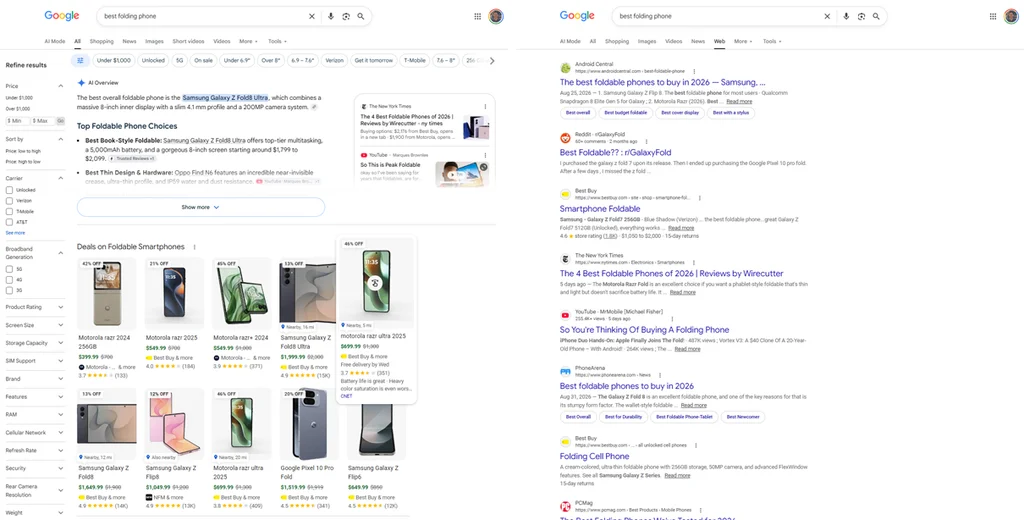
As Google continues to integrate AI-generated summaries at the top of its search results, some users have sought ways to revert to a more traditional interface. These AI overviews, while intended to provide quick answers, have faced scrutiny regarding accuracy and clutter.
To bypass these additions, users can select the "Web" filter located in the search results navigation bar. This setting hides AI summaries, shopping modules, and news suggestions, providing a list of links similar to the standard search experience prior to the update.
More advanced users can achieve this by appending the parameter &udm=14 to the end of a Google search URL. Platforms such as UDM14 are designed to automate this process, allowing users to perform standard searches without manually configuring browser settings or installing software extensions.
These workarounds do not require external software or logins. By utilizing these native functions, users can maintain a streamlined search experience that prioritizes organic web results over automated content generation.