Recoveryfix Guides Shared Calendar Creation in Microsoft 365
Software provider Recoveryfix has released a guide detailing the process for creating a shared calendar within Microsoft 365. The instructions focus on establishing a security group and a shared mailbox.
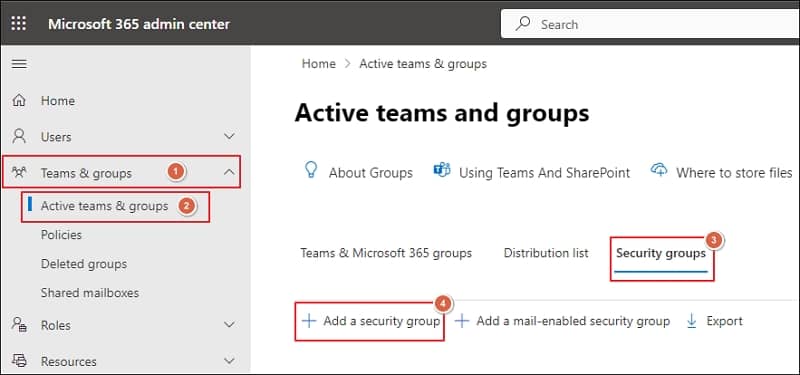
Software company Recoveryfix has published a guide for Microsoft 365 users on how to create a shared calendar, a feature designed to enhance schedule management for teams and groups.
The guide addresses potential user hesitation with the technicalities involved in setting up shared calendars. Recoveryfix breaks down the process into segments, beginning with the creation of a security group that will contain the users granted access to the shared calendar. This initial step involves logging into the Microsoft 365 admin center and configuring the group's membership.
Following the security group setup, the process moves to creating a shared mailbox. This mailbox is then configured to grant full access permissions to the previously established security group. The guide outlines specific steps within the Exchange admin center for this mailbox creation and delegation.
Recoveryfix also mentions its Recoveryfix Backup for Microsoft 365 software. The company highlights the benefits of shared calendars, including controlled multi-user access, integration with applications like Outlook and Teams, real-time updates, and cross-device compatibility.